ScrollPane and popup menus
Both modules are always available, with no feature flag, and come from the
classic Turbo Vision add-on kits: ScrollPane from TV Tool Box's scrolling
dialog boxes, popup_menu from the context-menu kits built on MenuBox.
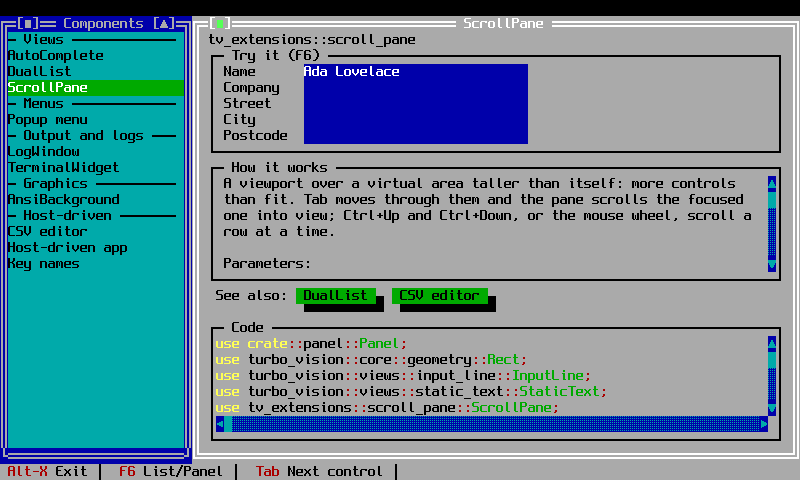
ScrollPane
ScrollPane is a viewport over a virtual area larger than its own screen
bounds. Children are added with bounds relative to the virtual area; the pane
repositions them as it scrolls and clips drawing to its own bounds. A Tab
focus change that lands on a control scrolled out of view is scrolled back
into sight automatically, and Ctrl+Up / Ctrl+Down and the mouse wheel scroll
a row at a time.
use turbo_vision::core::geometry::Rect;
use tv_extensions::ScrollPane;

// A 40x10 window over a 40x30 virtual form
let pane = ScrollPane::new(Rect::new(0, 0, 40, 10), 30);
assert_eq!(pane.scroll_offset(), 0);
ScrollPane::new(bounds, virtual_height):boundsis the pane's own screen size;virtual_heightis the virtual area's height in rows (it is raised to at leastbounds.height()).add(view, virtual_rect)adds a child atvirtual_rect, relative to the virtual area.scroll_to(offset)/scroll_by(rows)move the view; the offset is clamped to[0, virtual_height - bounds.height()].group()/group_mut()give access to the interiorGroupdirectly.
See examples/scroll_and_popup.rs for a ScrollPane holding ten fields in a
window twelve rows tall, scrolled with the wheel.
Popup menus
popup_menu(terminal, position, menu) runs a Menu as a modal context menu
at position (typically the mouse location), reusing the framework's
MenuBox so navigation, accelerators and drawing all match drop-down menus.
It returns the selected command, or None when the menu was dismissed.
use turbo_vision::core::geometry::Point;
use tv_extensions::popup_menu;

match popup_menu(&mut app.terminal, Point::new(10, 5), menu) {
    Some(command) => { /* dispatch command */ }
    None => { /* dismissed */ }
}
set_menu_item_checked(menu, index, checked) and
is_menu_item_checked(menu, index) set and query a check mark on a menu
item — the TV Tool Box check-mark menu convention. A checked item is drawn
with a leading ✓; an unchecked one gets a two-space prefix so captions
stay aligned. Separators and submenus are left untouched.
See examples/scroll_and_popup.rs for a context menu opened on F9, with a
"Word wrap" item whose check mark toggles and persists across openings.