CSV editor
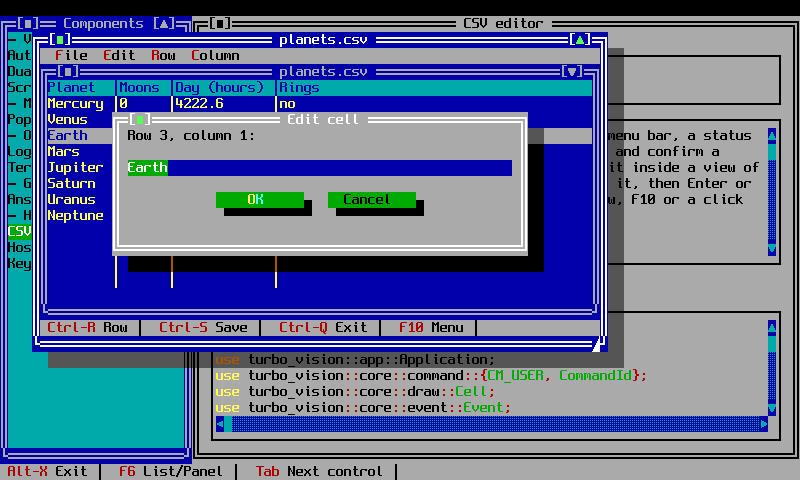
csv (feature csv) is a CSV table editor: a Session holding one document
in a window with a menu bar, a status line, and non-modal dialogs for
editing cells, columns, rows, and new/open/save. The session is
host-driven, like host: the caller pushes one key with
Session::key, asks for a frame with Session::step, and reads the
finished cells from Session::buffer.
Documents and storage
CsvDocis the table being edited: a header row and a rectangular, never-empty body, with a modified flag.CsvDoc::from_textparses RFC 4180 CSV (quoted fields, doubled quotes, embedded commas and newlines, CRLF or LF in);to_textwrites it back out (LF). A parse error comes back as its 1-based line number, and the document is marked modified so the editor warns that saving will drop anything after that line.- Documents live on a
Disk:FsDiskfor a directory on the local filesystem — file names only, so a name containing a path separator or.., or an empty name, is refused and the editor can never reach outside its root — orMemDisk, an in-memory map, for tests.
Driving a session
use tv_extensions::csv::{MemDisk, Session};

let mut session = Session::open(80, 24, "", Box::new(MemDisk::default()));
session.step(80, 24);
let _cells = session.buffer(); // the finished frame, cell by cell
Session::open(w, h, arg, disk) opens arg from disk (a blank document
when arg is empty), or the sentinel csv::OPEN_DIALOG_ARG ("/") to start
blank with the Open dialog already showing. Session::key returns
Some(line) once the editor wants to close — the caller stops pumping keys
and can show line as a scrollback message; Session::into_disk gives the
disk back once a session ends, and Session::doc reads the document being
edited.
Bridged grids
When a loaded document's first header cell is literally #, the session
treats it as a grid whose shape and name a server owns ("bridged"): New,
Open, Save As, column insert/delete, and renaming the header are refused
with a message, editing the # cell itself is refused, and deleting a row
asks for confirmation because the row is removed from the store once the
grid closes. An ordinary document (no # first header cell) is unaffected.
On a real terminal
examples/csv_edit.rs drives a Session from a real terminal:
Each key read from the terminal goes to session.key; each frame is copied
cell by cell from session.buffer() to the terminal, then session.cursor()
tells it where to show the terminal's own cursor: Some((x, y)) shows it
there, None hides it.
The cursor
Session::cursor() reports the screen cell where the edit-cell, rename and
save-as dialogs' input line shows its text cursor, or None while no dialog
with one is open — the table itself has no text cursor to show. A host that
cannot place a real cursor can draw that cell reversed instead.