Log window and terminal widget
log (feature log) provides a scrolling output pane (TerminalWidget,
matching Borland's TTerminal) and a window that shows tracing events in
it (LogWindow, fed by LogSubscriber, a tracing::Subscriber).
TerminalWidget
A read-only, auto-scrolling viewer for program output: build output,
command logs, debug console text. A line can carry a single colour
(append_line_colored) or several coloured runs drawn left to right
(append_line_spans, built from Spans — a run with no attribute of its
own takes the line's). Up/Down/PgUp/PgDn/Home/End and the mouse wheel
scroll it; with_scrollbar() adds a vertical scrollbar that tracks the
position, and scrolling away from the bottom turns auto-scroll off until
End (or a new line while already at the bottom) turns it back on.
use turbo_vision::core::geometry::Rect;
use turbo_vision::core::palette::{Attr, TvColor};
use tv_extensions::log::TerminalWidget;

let mut widget = TerminalWidget::new(Rect::new(0, 0, 60, 20)).with_scrollbar();
widget.append_line_colored(
    "build started".to_string(),
    Attr::new(TvColor::LightGreen, TvColor::Black),
);
See examples/terminal_widget.rs for one inside a Dialog alongside
Start/Stop/Clear buttons, streaming a simulated, colour-coded build log.
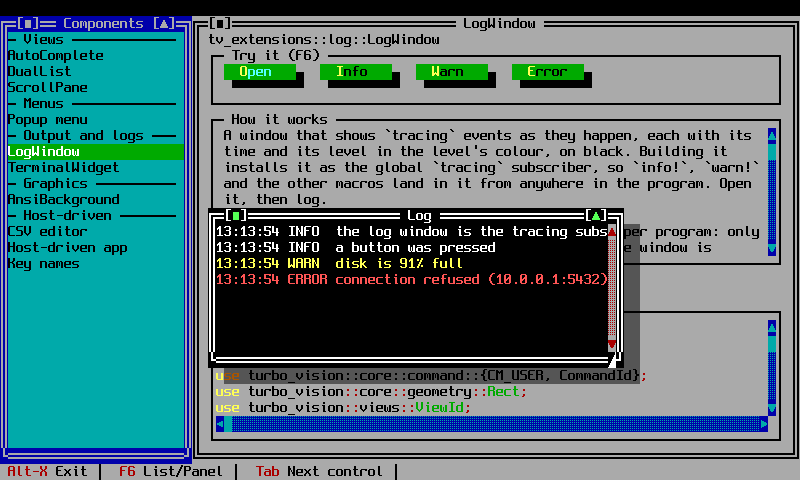
LogWindow
LogWindowBuilder builds a window that installs itself as the process's
global tracing::Subscriber when built: from then on, every
tracing::info!(), debug!(), warn!(), error!() call routes to the
window, timestamped and coloured by level, on a black background.
use turbo_vision::core::geometry::Rect;
use tv_extensions::log::LogWindowBuilder;

let log_window = LogWindowBuilder::new()
    .bounds(Rect::new(0, 0, 80, 15))
    .title("Log")
    .min_level(tracing::Level::DEBUG)
    .build();
app.desktop.add(log_window);

tracing::info!("Application started");
LogWindowBuilder::new() defaults to min_level TRACE (show everything)
and a 10,000-line scrollback (max_lines). LogWindow::log appends a line
manually, bypassing tracing; clear empties the window. Installing a
second global subscriber elsewhere in the process is ignored rather than
panicking (tracing::subscriber::set_global_default returns an error that
is discarded), so the first LogWindow built wins.
See examples/log_window.rs for a full application that logs through
tracing on startup and on a status-line command.